In the rapidly evolving landscape of 2026, the concept of "work" has transformed. We are no longer just managing tasks; we are managing information, relationships, and artificial intelligence agents that work alongside us. The tools we use to orchestrate this symphony of productivity have had to evolve or risk obsolescence.
The days of simple to-do lists are long gone. Today's best project management systems are full-fledged operating systems for your business. They integrate communication, documentation, asset management, and automated workflows into a single pane of glass. But with so many options flooding the market—each promising to be the "all-in-one" solution—how do you choose?
We have spent months testing, stress-testing, and living inside the leading platforms. We've looked beyond the marketing hype to understand the real-world utility of these tools. Whether you are a solo freelancer, a growing digital agency, or a multinational enterprise, there is a tool on this list for you.
Here is our comprehensive review of the Top 5 Best Project Management Systems in 2026.
1. Notion
The "Lego Set" for Your Digital Life
Notion remains the undisputed champion of flexibility. It started the "doc-centric" revolution, blurring the lines between a note-taking app and a database. In 2026, Notion has matured from a blank canvas into a sophisticated productivity engine that powers entire companies.
Key Features
- Relational Databases 3.0: Notion's core strength is its database system. You can link a "Projects" database to a "Tasks" database and a "Clients" database, creating a web of interconnected information. Updates in one view propagate everywhere. The new "Data Graph" view allows you to visualize these connections like a mind map.
- Notion AI Agents: AI is no longer just for summarizing text. Notion's AI agents can now perform actions within your workspace. You can tell your AI, "Create a sub-task for every meeting action item," and it will parse your notes and populate your database automatically.
- Teamspaces: This feature allows large organizations to partition their workspace into dedicated areas for different departments (Marketing, Engineering, HR) with distinct permission settings, ensuring that clutter is contained while information remains accessible.
- Seamless Publishing: Notion sites in 2026 rival dedicated CMS platforms. You can publish a help center, a blog, or a portfolio directly from your workspace with custom domains and SEO tools built-in.
Pricing
- Free: Unlimited blocks for individuals, restricted block trial for teams.
- Plus: $10/user/month (billed annually). Removes block limits and adds unlimited file uploads.
- Business: $18/user/month. Adds SAML SSO, private teamspaces, and advanced page analytics.
- Enterprise: Custom pricing. Advanced security controls and dedicated success manager.
Pros
- Unmatched Flexibility: If you can dream it, you can build it. From CRM to recipe book to sprint tracker, Notion adapts to your mental model.
- Unified Ecosystem: Keeps your docs, wikis, and tasks in one place, reducing the "tab fatigue" of switching apps.
- Beautiful Design: The minimalist aesthetic invites you to write and organize. It feels less like "work software" and more like a creative studio.
Cons
- Steep Learning Curve: The "blank page" problem is real. New users can feel overwhelmed by the possibilities and may struggle to set up a functional system without templates.
- Mobile Performance: While improved, the mobile app can still feel slower and more cluttered compared to dedicated mobile-first task apps.
2. ClickUp
The "One App to Replace Them All"
ClickUp’s ambition has always been to be the singularity of productivity software. In 2026, they have largely succeeded. ClickUp is a feature-dense powerhouse designed for organizations that want granular control over every aspect of their workflow.
Key Features
- The "Everything" View: Managers love this. You can pull data from every list, space, and folder in your entire organization into a single, filterable view. Spot bottlenecks across ten different departments in seconds.
- Custom Views Galore: ClickUp offers over 15 different ways to view your work, including List, Board, Calendar, Gantt, Timeline, Box, Mind Map, and Workload. You can even embed other apps like Google Sheets or Figma directly into a view.
- ClickUp Brain: Their answer to AI integration. It’s deeply embedded in search, answering questions like "What was the decision on the Q3 marketing budget?" by scanning tasks, docs, and chat logs instantly.
- Pulse & Workload Management: A proprietary feature that uses machine learning to estimate if a team member is over capacity based on their historical velocity and current task complexity.
Pricing
- Free Forever: Best-in-class free plan with 100MB storage and unlimited tasks.
- Unlimited: $7/user/month. Unlimited storage, guests, dashboards, and integrations.
- Business: $12/user/month. Advanced time tracking, workload management, and goal folders.
- Enterprise: Custom pricing. White labeling, MSA/HIPAA compliance, and guided onboarding.
Pros
- Extreme Configurability: You can toggle features on and off at the space level. Engineering can have "Sprints" enabled, while Marketing has "Review Proofing" turned on.
- Development Speed: The ClickUp team ships updates at a breakneck pace (almost weekly), meaning bugs are squashed fast and new features arrive constantly.
- Cost-Effective: For the sheer volume of features provided, ClickUp is aggressively priced compared to buying separate tools for docs, whiteboards, and tasks.
Cons
- Features Overload: The UI can be cluttered. There are buttons, menus, and options everywhere. It requires a dedicated "champion" in your company to configure it correctly so teams don't get lost.
- Performance Hitches: Due to the complexity of the app, it can sometimes feel sluggish, especially when loading massive lists with hundreds of custom fields.
3. Trello
Sometimes, you don't need a spaceship; you just need a really good whiteboard. Trello remains the gold standard for visual project management. In 2026, it stays true to its roots: simple, tactile, and effective.
Key Features
- The Card System: Trello cards are digital sticky notes on steroids. You can attach files, checklists, labels, and due dates. The physical act of dragging a card from "Doing" to "Done" provides a dopamine hit that no checkbox can match.
- Butler Automation: Trello’s automation engine is deceptively powerful. accessible via "plain English" commands. You can set rules like "When a card is moved to 'Review', add the 'Urgent' label and post a message to Slack."
- Power-Ups: Since Trello is simple, it relies on Power-Ups for extra functionality. You can power up a board with a Calendar view, a naive voting system, or custom fields for tracking software versions.
- Trello Views: Beyond the board, premium plans now offer Timeline, Table, and Dashboard views to help visualize work across multiple boards.
Pricing
- Free: Unlimited cards and members, up to 10 boards.
- Standard: $5/user/month. Unlimited boards and advanced checklists.
- Premium: $10/user/month. Dashboard view, Timeline view, and admin security controls.
- Enterprise: $17.50/user/month. Multi-board guests and attachment permissions.
Pros
- Zero Learning Curve: You can onboard a new team member in 5 minutes. "This is a card, move it here when you're done." Simple.
- Visual Clarity: At a glance, you know exactly what the status of a project is. It is unbeatable for high-level overviews.
- Fun: Custom backgrounds and stickers make the workspace feel friendly and less corporate.
Cons
- Scaling Issues: Trello struggles with complexity. A board with 500 cards becomes unmanageable. It’s not built for massive backlogs or complex dependencies.
- Lack of Native Features: Relying on Power-Ups for basic features (like time tracking or reporting) can feel disjointed and expensive if you need many of them.
4. Zoobbe
The Visual Kanban King
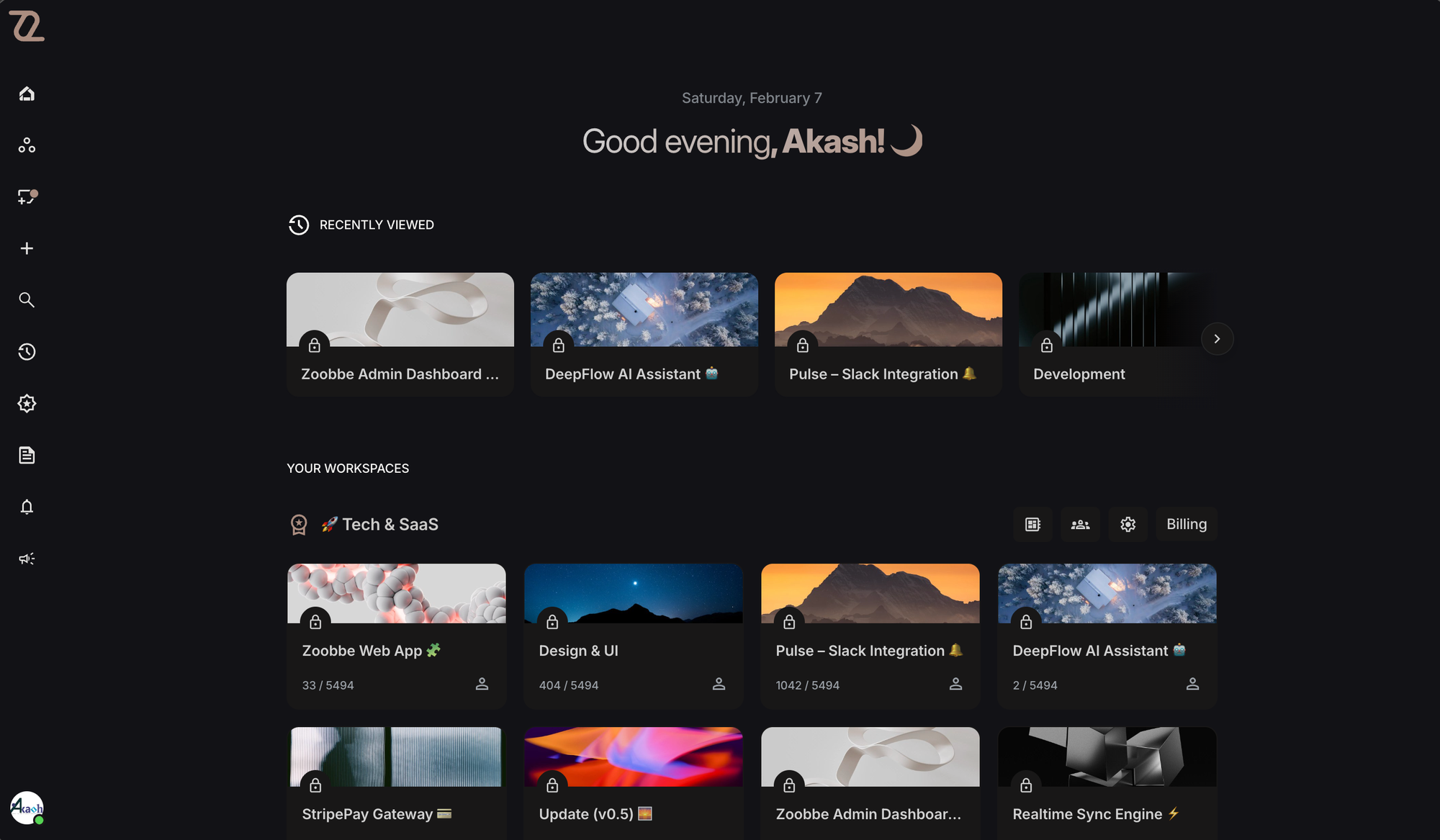
If Trello is the friendly whiteboard for your team, Zoobbe is the high-performance command center for your entire company.
While other starts to struggle with a few thousand cards, Zoobbe is engineered to handle millions without a stutter. It uses advanced virtualization to ensure that whether you have 50 tasks or millions, the interface remains buttery smooth.
Why It’s On The List
Zoobbe excels at visualizing workflows. Whether you're tracking improved software development sprints or managing a content calendar, its board view is fast, intuitive, and highly customizable. But what truly sets it apart is how it doesn't force you to leave your project management tool to write documentation—it brings the docs to the project.
Key Features
- Advanced Kanban Boards: Managing tasks in Zoobbe is a delight. You can create custom statuses, assign multiple team members, set due dates, and add rich descriptions. The drag-and-drop interface is buttery smooth, making it easy to prioritize work on the fly.
- Zoobbe Pages: Uniquely, Zoobbe includes a full-featured documentation system. You can create nested pages for specifications, wikis, or meeting notes, and link them directly to your tasks. No more hunting for "that Google Doc" with the requirements.
- Real-Time Collaboration: Built with advanced socket technology, updates are instantaneous. Whether you're moving a card or editing a description, your team sees changes in real-time without refreshing.
- Zoobbe Intelligence (AI):
- Smart parsing: Turn messy meeting notes into actionable tasks with a single click.
- Natural Language Search: Find any task or document by simply asking, "Show me high-priority bugs assigned to Sarah."
- White Labeling: A standout feature for agencies. You can fully brand the Zoobbe interface with your logo, colors, and domain (e.g.,
projects.youragency.com), giving your clients a professional portal without building one from scratch. - Analytics & Insights: Track team velocity and project health with built-in dashboards that require zero configuration.
Pricing
- Free: Up to 15 collaborators, 15 boards, and 512MB storage. Perfect for small teams getting started.
- Standard: Unlimited collaborators, boards, and cards. Includes advanced checklists and team management.
- Premium: Adds White Labeling, data export, custom domains, and priority support. Ideally for growing agencies.
- Enterprise: Advanced reporting, role management, and SSO (Coming Soon) for large organizations.
Pros
- Simplicity: It feels as easy to use as Trello, but with none of the limitations. No heavy configuration needed.
- Speed: Every interaction feels instantaneous. It respects your time.
- Scalability: You won't "outgrow" Zoobbe. It grows with your ambition.
Cons
- Newer Ecosystem: Fewer third-party Power-Ups than Trello, relying instead on a robust API.
5. Asana
The Structured Specialist for Enterprises
If Trello is a whiteboard, Asana is a spreadsheet with a soul. It brings order to chaos. Asana is designed for structured work where deadlines, dependencies, and responsibilities must be crystal clear.
Key Features
- Timeline (Gantt) View: Asana’s timeline is best-in-class. It’s intuitive, colorful, and makes managing dependencies (Task B cannot start until Task A finishes) easy. If a date slips, you can drag the entire project chain to update the schedule automatically.
- Portfolios: This is a management superpower. Portfolios allow you to group multiple projects together to monitor their health. A VP of Marketing can see the status of "Social Media Campaign," "Brand Refresh," and "Confrence Prep" all on one dashboard.
- Workload Management: Asana calculates the effort required for tasks and visualizes team bandwith. You can spot if one designer is overloaded while another is free, and rebalance work with drag-and-drop.
- Goals: A dedicated improved section for tracking OKRs (Objectives and Key Results). You can link individual tasks to high-level company goals, so every employee knows how their work contributes to the mission.
Pricing
- Personal: Free. Up to 15 teammates. Basic tasks and list/board views.
- Starter: $10.99/user/month. Timeline, Workflow builder, and unlimited dashboards.
- Advanced: $24.99/user/month. Portfolios, Workload, and Goals.
- Enterprise: Custom. Data loss prevention (DLP) and HIPAA compliance.
Pros
- Clarity of Responsibility: Asana enforces a "one assignee per task" rule. This ensures there is never confusion about who is responsible for delivery.
- Beautiful UI: Asana is polished. The animations, the "celebration creatures" (unicorns flying across the screen on task completion), and the clean typography make it a joy to use.
- Scalability: Unlike Trello, Asana handles projects with thousands of tasks without breaking a sweat.
Cons
- Pricey: The aggressive pricing, especially for the "Advanced" tier which unlocks the best features like Portfolios, can be a hurdle for smaller teams.
- Rigidity: Asana has a "way" of doing things. If your team's workflow doesn't fit their model, it can feel restrictive compared to Notion or ClickUp.
Summary Comparison Table
| Feature | Notion | ClickUp | Zoobbe | Trello | Asana |
|---|---|---|---|---|---|
| Best For | Custom Workflows | Power Users | Collaboration & Agencies | Visual Simplicity | Structured Projects |
| Learning Curve | High | High | Very Low | Very Low | Medium |
| Document Support | Excellent (Native) | Good (Native) | Excellent (Native) | Basic (Attachments) | Moderate (Description) |
| AI Capabilities | High | High | High (Generative + Actions) | Low | Medium |
| White Labeling | No | Enterprise Only | Yes (Agency Plan) | No | No |
| Starting Price | Free / $10 | Free / $7 | Free / $4.99 | Free / $5 | Free / $10.99 |
Frequently Asked Questions (FAQ)
1. What is the best free project management software in 2026?
If you are looking for the most generous free plan, ClickUp and Zoobbe are the top contenders. ClickUp offers unlimited tasks and members on its free tier, which is unheard of. Zoobbe's free tier is perfect for small teams (up to 15 collaborators) who need full feature access without a time limit. Trello is also excellent if your needs are simple and visual.
2. Which tool is best for personal use?
For managing personal life, side projects, or studies, Notion is the winner. Its flexibility allows you to build a "Life OS" that tracks everything from gym workouts to reading lists alongside your professional tasks.
3. Is Zoobbe suitable for large enterprises?
Absolutely. While Zoobbe is newer than Asana, its architecture is built for scale. The "Deep Nesting" of pages allows complex organizations to structure unlimited layers of hierarchy (Division > Department > Team > Squad > Project) without clutter. Plus, its White Label capabilities make it the only choice for large agencies that want to present a unified brand to global clients.
4. How secure are these cloud-based tools?
All tools on this list utilize enterprise-grade encryption tracking (SOC 2 Type II compliance). Asana and ClickUp have the longest track record in this space, but Zoobbe has made security a core pillar with features like self-hosted instances for Enterprise clients.
5. Can I migrate data from Trello or Jira to these tools?
Yes.
- ClickUp has the most robust import engine, capable of pulling data from almost any competitor in minutes.
- Zoobbe offers a specialized "One-Click Import" for Notion and Trello, preserving your page structures and card placements perfectly.
- Notion has improved its importer significantly, especially for Evernote and Google Docs users.
Conclusion
The market for project management software in 2026 is richer than ever.
- If you value customization above all else and want to build your own "operating system," Notion is your best bet.
- If you want every feature imaginable straight out of the box, ClickUp is the tool for you.
- If you want a workspace that’s fast, simple, and powerful, Zoobbe is the solution for agencies and modern teams—complete with client portals and deep documentation to set you apart.
- If you need visual simplicity for a small team, stick with Trello.
- If you are a large organization needing structured accountability, Asana is the reliable standard.
The "best" tool is the one your team actually uses. We recommend picking top 2 contenders from this list and running a 2-week pilot with a small squad. Happy planning!